Agentic RAG: Tutorial & Examples
Agentic RAG is a next-generation extension of Retrieval-Augmented Generation (RAG) where autonomous AI agents plan, retrieve information, and reason across multiple tools, APIs, and data sources.
Traditional RAG pipelines are essentially one-shot: the system retrieves relevant documents for a query and then generates an answer without any intermediate decision-making or feedback loop. This works well for straightforward questions, but it falls short for more complex, multi-step tasks. Agentic RAG builds on RAG by adding a planning loop, memory, and tool usage, enabling the AI to handle evolving queries and perform reasoning over multiple steps.
This article explores the limitations of traditional RAG, how Agentic RAG works, and how to implement it using examples with LangGraph.
You will learn the key differences between traditional RAG and Agentic RAG, know how to start building agentic RAG applications, and discover best practices to make them reliable.
Summary of key agentic RAG concepts
| Concept | Agentic RAG | Traditional RAG |
|---|---|---|
| What it does | Introduces planning, memory, and dynamic control flow to handle complex, multi-step tasks. | Executes a single retrieval followed by generation, with no awareness or adaptability. |
| Execution flow | Agentic RAG follows a multi-step, iterative loop in which the agent plans, retrieves data, uses tools, evaluates, and dynamically decides next steps. | Fixed, one-shot pipeline |
| Reasoning | Supports explicit multi-hop reasoning. Agents break down queries into sub-goals, reason through intermediate steps, and revise their plan as needed to reach a more accurate or complete answer. | Reasoning is limited to context retrieval and context-based response. |
| Tool Integration | Goes beyond vector search. Agents can flexibly use external APIs, databases, calculators, and other tools, choosing what to invoke based on the query and task context. | Limited to vector search |
| Adaptability | Agent behavior evolves based on retrieved results and intermediate feedback. If a retrieval fails or yields insufficient data, the agent can adjust its strategy or switch tools. | Static, pre-determined flow |
| Personalization | Can tailor responses using user-specific data, such as preferences, historical queries, or user profiles, enabling more relevant, context-aware outputs. | Can also do the same, but in a limited, pre-determined manner. |
| Error recovery | Includes mechanisms for re-planning, retrying failed tool calls, and course-correcting based on the evolving context. | Lacks built-in feedback or correction loops. |
| Observability and evaluation | Agentic RAG systems expose intermediate steps, such as planning decisions, tool calls, and retrieved context, enabling the tracing of execution, the evaluation of reasoning quality, and the diagnosis of failures across multi-step workflows. | Limited observability capability |
What is RAG, and why do we need it?
Retrieval-Augmented Generation (RAG) is a technique to augment an LLM’s knowledge by retrieving relevant external documents at inference time.
In essence, instead of relying solely on the model’s built-in training data, which may be outdated or limited in domain knowledge, a RAG system fetches up-to-date or domain-specific information. It supplies the model with additional context. This approach dramatically improves factual accuracy and reduces hallucinations, because the model’s answer is “grounded” in retrieved evidence.
For example, imagine you have a collection of company policy documents, and you want to build a Q&A assistant. A traditional LLM might not know your company’s specific policies. A RAG pipeline, on the other hand, retrieves the relevant policy text for a given question and then has the LLM generate an answer using that text as context. This makes the answer both accurate and specific to your documents.
{{banner-large-dark-2="/banners"}}
How traditional RAG works
Traditionally, the RAG workflow consisted of three main phases:
Vector store creation and indexing
In the first step, a vector store is created, where the document chunks containing custom knowledge are converted into embedding vectors and stored in a vector database.
Retrieval
First, the system finds relevant data from an external source based on the user’s query. Typically, this involves a vector database of embedded documents. All documents are pre-processed (split into chunks and embedded into vectors) to form a knowledge database. When a user asks a question, the query is also converted into an embedding, and the vector DB is queried for similar chunks (e.g., the top-k most relevant pieces) using semantic similarity techniques.
Generation
The retrieved text chunks are then input into the prompt of an LLM along with the original question, and the LLM generates a final answer using that information. Essentially, the model “augments” its knowledge with the retrieved context when crafting a response.
Limitations of traditional RAG
While traditional RAG is powerful for what it does, it has some key limitations that become apparent in more complex scenarios:
Single-turn, no lookahead
The traditional RAG pipeline is a unidirectional one-shot flow. The model cannot ask follow-up questions or perform multiple retrieval rounds. If the needed information wasn’t fetched in a single retrieval step, the opportunity is lost. Multi-hop questions, in which answering requires retrieving one piece of information, then using it to retrieve another, etc., become problematic.
Fixed tooling
Traditional RAG typically only uses a vector database lookup as its “tool.” It can’t perform actions beyond document retrieval. If a query requires, say, performing a calculation, invoking an API, or using a different knowledge source, vanilla RAG has no facility to do that. It’s basically stuck with the documents you gave it.
Limited adaptability
Because the flow is predetermined, the system can’t dynamically adjust if something goes wrong or if the query takes an unexpected turn. For instance, if the retrieved documents aren’t sufficient, a simple RAG system might just produce a vague answer or say “I don’t know.” There’s no built-in mechanism to realize the gap and attempt a different strategy.
Opaque reasoning
Debugging a RAG pipeline is mostly about checking the inputs and outputs at each step, e.g., which documents were retrieved and which answer was generated. You don’t get to see how the model decided to answer beyond that, since the model’s reasoning process is hidden in a single prompt. If the answer is wrong, you have to guess whether the retrieval failed or the model ignored the context. There’s no explicit trace of its thought process.
Agentic RAG addresses many of these limitations by making the system more interactive, flexible, and intelligent.
Agentic RAG: RAG with reasoning and tools
Agentic RAG combines the retrieval-augmented approach with an agent that can plan actions, use tools, and maintain memory across multiple steps. In other words, Agentic RAG is an autonomous AI agent that doesn’t just fetch context once but can iteratively decide what to do (e.g., retrieve more info, call an API, etc.) and when to stop.

How agentic RAG works
Instead of a fixed pipeline, an Agentic RAG system implements a loop of reasoning and action. A typical Agentic RAG workflow might look like this:
User request
The user’s question or task comes in. The agent interprets the goal.
Planning/reasoning
The agent determines what steps or information it needs to solve this problem. It may break the problem into sub-tasks. For example, if asked, “Do I have enough vacation days to take a 2-week trip next month?”, the agent might reason: “First, retrieve the user’s current leave balance. Then check the policy for accruing leave and calculate if 2 weeks is <= balance.”
Tool use/retrieval
Based on its plan, the agent calls tools to get information. Tools could include:
- A vector database search, just like RAG’s retriever, but now it can be invoked whenever needed, not just once.
- Other databases or APIs, such as an HR database to retrieve a user’s remaining leave or a web search for external information.
- Utility functions like calculators, code execution, etc., necessary for the task.
The agent decides which tool to use and with what input. This is often done using a ReAct-style loop (Reasoning and Acting), in which the LLM produces an action such as “use tool X with input Y” and then receives the tool’s output (an observation) to inform the next step.
Observation and iteration
When the agent gets a tool’s result, it incorporates that into its state, called a “memory” or context for subsequent steps. Then it can reason again: Did that answer the question fully? If not, what’s the next step?
It loops back to planning, possibly uses another tool, and so on. Crucially, the agent’s execution adapts based on what it finds. If the first retrieval wasn’t enough, it can try a different query or call a different tool.
Final answer
Eventually, the agent decides it has enough information and produces a final answer for the user. This might be synthesized from all the data gathered along the way.
The following figure demonstrates the workflow of an Agentic RAG pipeline. Once a user query is received:
- The agent executes a feedback loop where
- The agent’s thoughts (reasoning) lead to
- Actions (tool calls) which produce
- Observations that feed back into the agent’s next iteration.
The loop continues until the agent’s reasoning indicates it's done, at which point it outputs the answer.
This approach endows the system with flexibility: it can handle tasks that require multiple steps, adjust when a step doesn’t yield a complete answer, and integrate information from various sources (not just a single vector store) as needed.
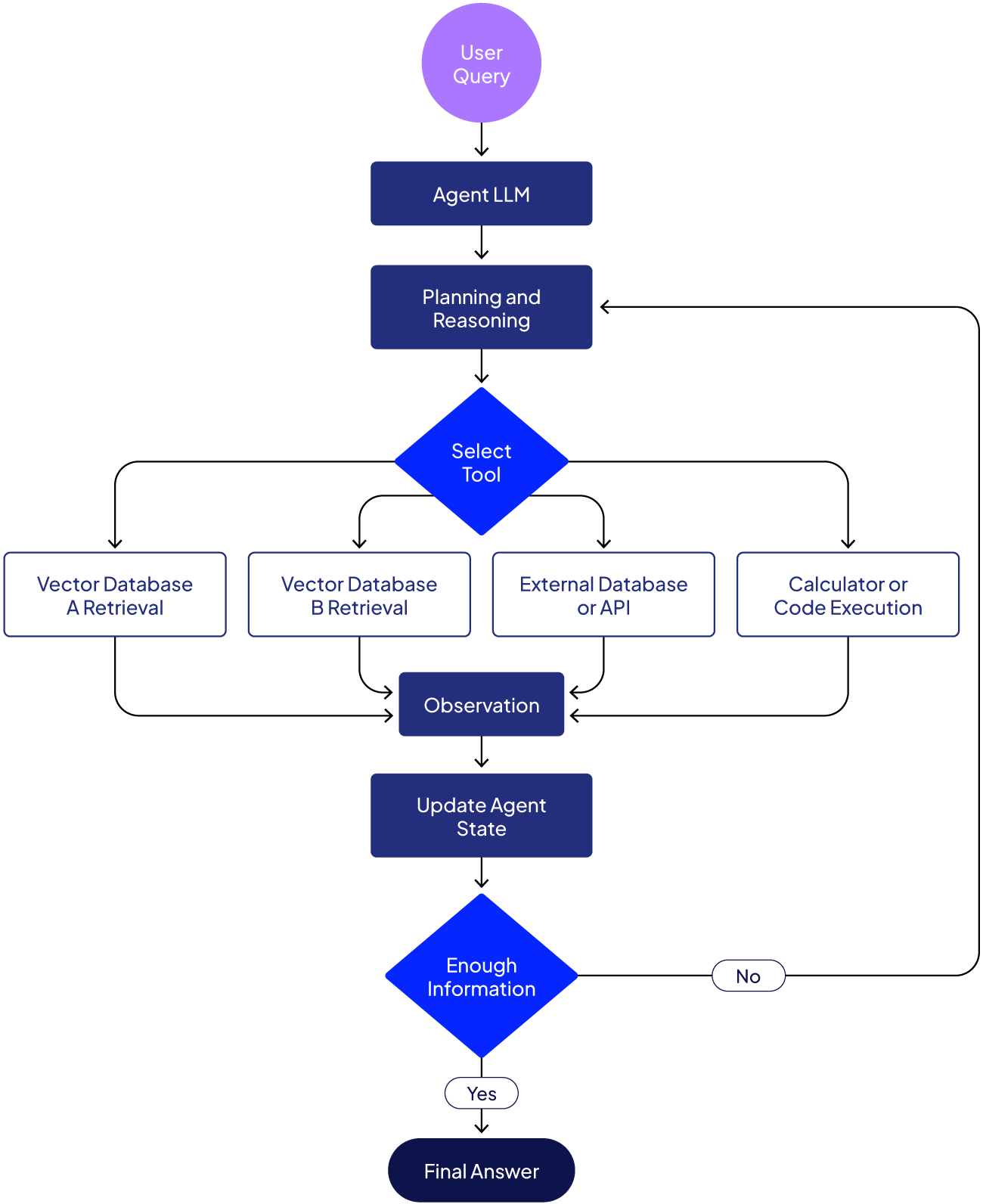
Note: Similar to traditional RAG, the document chunking, embedding generation, and vector store indexing steps are performed before vector database retrieval in agentic RAG.
Agentic RAG implementation example
To illustrate an agentic RAG implementation, consider a scenario in which an HR assistant answers questions about employee benefits and policies. We have multiple data sources: a database of employee information (for personalized answers) and two policy documents (e.g., leave policy and promotion/bonus policy, in PDF format).
We want the AI agent to:
- Fetch the relevant employee’s data for personalization.
- Depending on the question, search the appropriate policy document for the answer, using the employee context.
- Formulate the answer by combining the policy info and the user’s details.
Let’s see how an agentic RAG implements the above logic.
Note: The codes for this article are available in this GitHub repository.
Step 1: Installing and importing required libraries
Run the scripts below to install and import the required libraries.
!pip install -q langgraph langchain langchain-openai langchain-community
!pip install -q chromadb
!pip install -q langchain-chroma
!pip install -q pypdf
import os
import sqlite3
from langchain_openai import ChatOpenAI, OpenAIEmbeddings
from langchain_core.tools import tool
from langchain_core.messages import HumanMessage
from langchain_chroma import Chroma
from langchain_community.document_loaders import PyPDFLoader
from langchain_text_splitters import RecursiveCharacterTextSplitter
from langgraph.prebuilt import create_react_agent
from langgraph.checkpoint.memory import MemorySaver
from dotenv import load_dotenv
from IPython.display import Image, display
import warnings
warnings.filterwarnings("ignore")
This example uses the OpenAI GPT-4 model for reasoning. You can use any other model as well.
# Set OpenAI API key
os.environ["OPENAI_API_KEY"] = os.getenv("OPENAI_API_KEY")

# Initialize OpenAI model
llm = ChatOpenAI(model="gpt-4o", temperature=0)
Step 2: Set up a database for storing user records
Next, set up a database containing fictional employee data. This database will serve as one of the sources of context for our agentic RAG application.
def initialize_database():
    conn = sqlite3.connect('company_data.db')
    cursor = conn.cursor()

    cursor.execute('''
    CREATE TABLE IF NOT EXISTS users (
        user_id INTEGER PRIMARY KEY,
        first_name TEXT,
        last_name TEXT,
        designation TEXT,
        seniority_level TEXT,
        department TEXT,
        hire_date TEXT,
        salary REAL,
        performance_rating TEXT
    )
    ''')

    users = [
        (1, 'John', 'Doe', 'Software Engineer', 'Senior', 'Engineering', '2020-01-15', 95000, 'Excellent'),
        (2, 'Jane', 'Smith', 'Product Manager', 'Mid-level', 'Product', '2021-03-20', 85000, 'Good'),
        (3, 'Alice', 'Johnson', 'Data Scientist', 'Junior', 'Data Science', '2023-06-01', 75000, 'Good'),
        (4, 'Bob', 'Williams', 'Senior Architect', 'Principal', 'Engineering', '2018-09-10', 130000, 'Excellent'),
        (5, 'Carol', 'Brown', 'HR Manager', 'Senior', 'Human Resources', '2019-11-05', 90000, 'Excellent')
    ]

    cursor.executemany('INSERT OR REPLACE INTO users VALUES (?,?,?,?,?,?,?,?,?)', users)
    conn.commit()
    conn.close()
    print("Database initialized with 5 sample users!")

initialize_database()
Step 3: Set up vector databases for RAG
Next, we create a vector database containing company leave policies.
text_splitter = RecursiveCharacterTextSplitter(
    chunk_size=200,
    chunk_overlap=40,
    length_function=len
)

print("Text splitter initialized!")
LEAVE_POLICY_PDF_PATH = "/home/mani/PatronusAI/agentic_rag_memory/Company_Leave_Policies_Extended.pdf"

def load_leave_policy_vectorstore(pdf_path):
    if not os.path.exists(pdf_path):
        print(f"Warning: PDF not found at {pdf_path}")
        return None

    loader = PyPDFLoader(pdf_path)
    documents = loader.load()
    split_docs = text_splitter.split_documents(documents)

    embeddings = OpenAIEmbeddings()
    vectorstore = Chroma.from_documents(
        documents=split_docs,
        embedding=embeddings,
        collection_name="leave_policies",
        persist_directory="./chroma_db_leave"
    )

    print(f"Loaded {len(documents)} pages, split into {len(split_docs)} chunks")
    return vectorstore

leave_vectorstore = load_leave_policy_vectorstore(LEAVE_POLICY_PDF_PATH)
Additionally, create another vector database containing employee bonus and promotion policies.
PROMOTION_BONUS_PDF_PATH = "/home/mani/PatronusAI/agentic_rag_memory/Company_Promotion_Bonus_Policies_Enterprise_Grade.pdf"

def load_promotion_bonus_vectorstore(pdf_path):
    if not os.path.exists(pdf_path):
        print(f"Warning: PDF not found at {pdf_path}")
        return None

    loader = PyPDFLoader(pdf_path)
    documents = loader.load()
    split_docs = text_splitter.split_documents(documents)

    embeddings = OpenAIEmbeddings()
    vectorstore = Chroma.from_documents(
        documents=split_docs,
        embedding=embeddings,
        collection_name="promotion_bonus_policies",
        persist_directory="./chroma_db_promotion"
    )

    print(f"Loaded {len(documents)} pages, split into {len(split_docs)} chunks")
    return vectorstore

promotion_vectorstore = load_promotion_bonus_vectorstore(PROMOTION_BONUS_PDF_PATH)
Step 4: Defining tools for agentic RAG
We create three tools for our agentic RAG:
- `get_user_context`, which retrieves employee information from the employee database.
- `search_leave_policy`, which searches the leave policy vector database based on the employee information.
- `search_promotion_bonus_policy`, which searches the bonus and promotion vector database using the employee information.
get_user_context tool
@tool
def get_user_context(user_id: int) -> str:
    """Get user information from database to use as context.

    Args:
        user_id: The employee's user ID

    Returns:
        User context string with employee information
    """
    conn = sqlite3.connect('company_data.db')
    cursor = conn.cursor()
    cursor.execute('SELECT * FROM users WHERE user_id = ?', (user_id,))
    user = cursor.fetchone()
    conn.close()

    if not user:
        return f"User ID {user_id} not found"

    return f"""Employee Information\n:Employee: {user[1]} {user[2]}
Designation: {user[3]}
Seniority: {user[4]}
Department: {user[5]}
Performance: {user[8]}
Salary: ${user[7]}"""
search_leave_policy tool
@tool
def search_leave_policy(question: str, user_context: str) -> str:
    """Search leave policy documents with user context.

    Args:
        question: Question about leave policies
        user_context: User information context from get_user_context tool
    """
    if leave_vectorstore is None:
        return "Leave policy PDF not loaded"

    # Combine user context with question for better retrieval
    search_query = f"{user_context}\n\n{question}"

    retriever = leave_vectorstore.as_retriever(search_kwargs={"k": 3})
    docs = retriever.invoke(search_query)
    context = "\n\n".join([doc.page_content for doc in docs])

    return f"Relevant Leave Information Retrieved:\n{context}"
search_promotion_bonus_policy tool
@tool
def search_promotion_bonus_policy(question: str, user_context: str) -> str:
    """Search promotion and bonus policy documents with user context.

    Args:
        question: Question about promotion or bonus
        user_context: User information context from get_user_context tool
    """
    if promotion_vectorstore is None:
        return "Promotion/bonus policy PDF not loaded"

    # Combine user context with question for better retrieval
    search_query = f"{user_context}\n\n{question}"

    retriever = promotion_vectorstore.as_retriever(search_kwargs={"k": 3})
    docs = retriever.invoke(search_query)
    context = "\n\n".join([doc.page_content for doc in docs])

    return f"User Context: {user_context}\n\nRelevant Policy:\n{context}"
Step 5: Create a ReAct agent with RAG
The next step is to create the agent and give it these tools. The example also includes a system prompt that guides the agent’s strategy. The prompt explicitly states the order of operations: always retrieve user info first, then use it to query the appropriate policy tool. This helps the agent to plan the correct sequence of actions.
tools = [
    get_user_context,
    search_leave_policy,
    search_promotion_bonus_policy
]

system_prompt = """You are an HR assistant agent.

Tool Usage Instructions:
1. FIRST use 'get_user_context' with the user_id to get employee information
2. Use the user context from step 1 when calling RAG tools:
   - 'search_leave_policy': Pass question and user_context
   - 'search_promotion_bonus_policy': Pass question and user_context

Always get user context first before searching policies."""
Finally, create a ReAct agent using LangGraph's `create_react_agent` function.
memory = MemorySaver()

agent = create_react_agent(llm, tools,
                           prompt=system_prompt,
                           checkpointer=memory)

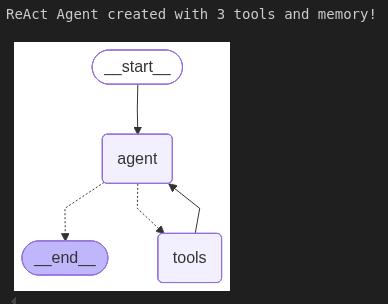
print("ReAct Agent created with 3 tools and memory!")

display(Image(agent.get_graph().draw_mermaid_png()))
Output:
Step 6: Querying agentic RAG
The agent is now ready to use. You can wrap it in a convenient query function.
def query_agent(question: str, user_id: int, thread_id: str = "default"):
    """Query the agent

    Args:
        question: The question to ask
        user_id: The user ID
        thread_id: Thread ID for conversation history
    """
    # Add user_id to the question context
    full_question = f"User ID: {user_id}\n\n{question}"

    config = {"configurable": {"thread_id": thread_id}}
    response = agent.invoke({"messages": [HumanMessage(content=full_question)]}, config)

    return response['messages'][-1].content
In the code above, we prepend the User ID {user_id} to the query content. This is a simple way to pass the user ID into the agent’s context so it knows which user’s info to fetch.
The `agent.invoke()` function in the above script prompts the agent with a system prompt and the user's question. The agent then starts its ReAct loop: likely the first thing it does is call the `get_user_context` tool (since we made that clear in the instructions). LangGraph executes the tool, retrieves the result (the user’s info), and feeds it back to the agent. The agent then decides the next action (perhaps a call to the `search_leave_policy` or `search_promotion_bonus_policy` tool, depending on the question), and so on.
Finally, when the agent believes it has all the information to answer the user’s question, it appends the final answer to the messages list and returns it. You can extract the content of the last message as the answer.
The `thread_id` parameter allows multiple queries in the same thread to persist in memory. For example, if the agent has a conversation with follow-up questions, the MemorySaver tracks prior interactions labeled with `thread_id`.
Let’s test our agent with a simple query:
result = query_agent("How many days of annual leave do I get?", user_id=1)
print(result)
Output:

The above output shows that the RAG first retrieved the user’s information (i.e., the user is a Senior Software Engineer) and based on that information returned the relevant annual leave policy.
Let’s ask a slightly more complicated question involving multiple tool calls.
result = query_agent("Get all my details and tell me if I am eligible for a bonus? How will I get it? How many paternity leaves will I get in a year?", user_id=1)
print(result)
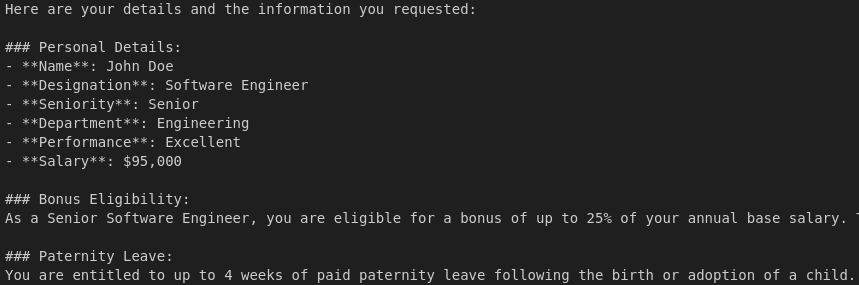
Output:
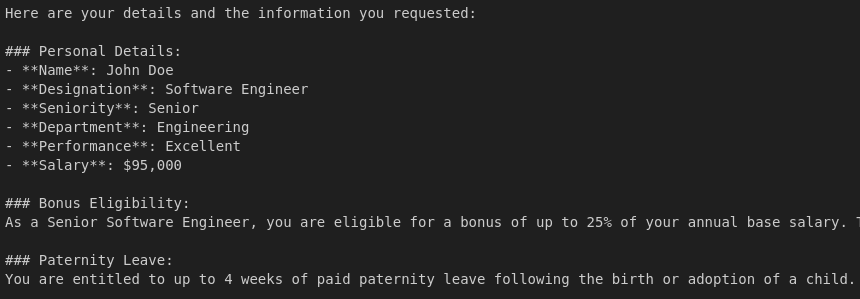
The output above shows that the agent retrieved the user’s personal information, then the relevant bonus policy, and finally the number of paternity leaves for a senior software engineer.
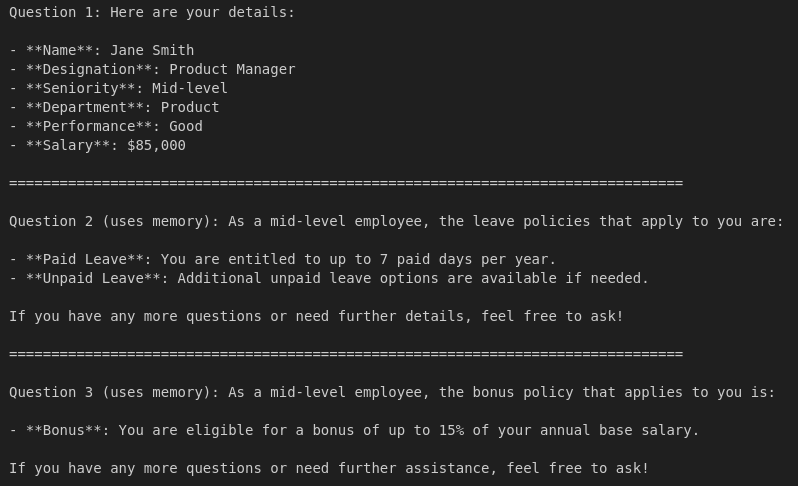
Finally, you can test the agent's memory by asking a follow-up question.
# First question
response1 = query_agent("What are my details?", user_id=2, thread_id="conv-1")
print("Question 1:", response1)
print("\n" + "="*80 + "\n")

# Follow-up 1
response2 = query_agent("What leave policies apply to me?", user_id=2, thread_id="conv-1")
print("Question 2 (uses memory):", response2)
print("\n" + "="*80 + "\n")

# Follow-up 2
response3 = query_agent("And bonus?", user_id=2, thread_id="conv-1")
print("Question 3 (uses memory):", response3)
Output:
How Patronus AI helps
Patronus AI is a platform-agnostic observability and evaluation platform built for modern LLM applications. It integrates with agent frameworks such as LangGraph, LangChain, and CrewAI to help developers trace agent workflows, identify failure points, and assess response quality.
As RAG systems evolve into more complex agentic pipelines, tracing and debugging the behavior of each reasoning step becomes a non-trivial challenge. Traditional RAG pipelines might only involve one retrieval and a generation step, but Agentic RAG systems introduce iterative planning, dynamic tool usage, and memory-driven decisions, all of which make it harder to spot where things go wrong. Patronus AI addresses this by offering platform-agnostic tools purpose-built to analyze, evaluate, and improve the reliability of these workflows.
One of the key components of Patronus AI is Percival, an AI debugger that observes and diagnoses the inner workings of an LLM application. Percival tracks not just inputs and outputs, but also every retrieval action, tool invocation, and internal decision made by the agent. This level of visibility is critical when an agentic RAG application spans multiple hops and dynamically adjusts its flow based on intermediate results.
Implementation example
Let’s see how to integrate Patronus AI's stack trace observability and debugging features into the LangGraph agentic RAG application implemented in the previous section.
Run the following script to install Patronus and other required libraries.
# Remove ALL preinstalled OpenTelemetry packages
!pip uninstall -y opentelemetry-sdk opentelemetry-api \
    opentelemetry-semantic-conventions opentelemetry-exporter-otlp \
    opentelemetry-exporter-otlp-proto-grpc opentelemetry-proto \
    opentelemetry-instrumentation opentelemetry-instrumentation-logging \
    opentelemetry-instrumentation-threading opentelemetry-instrumentation-asyncio

# Install Patronus and LangChain instrumentation first
!pip install patronus openinference-instrumentation-langchain langchain-mistralai langgraph

# Pin *all* OTel core packages to the version known to work
!pip install --force-reinstall \
    opentelemetry-api==1.37.0 \
    opentelemetry-sdk==1.37.0 \
    opentelemetry-semantic-conventions==0.58b0 \
    opentelemetry-exporter-otlp-proto-grpc==1.37.0 \
    opentelemetry-exporter-otlp==1.37.0 \
    opentelemetry-proto==1.37.0

# Pin instrumentation packages to compatible versions
!pip install --force-reinstall \
    opentelemetry-instrumentation==0.56b0 \
    opentelemetry-instrumentation-logging==0.56b0 \
    opentelemetry-instrumentation-threading==0.56b0 \
    opentelemetry-instrumentation-asyncio==0.56b0
Next, in the same directory as your LangGraph application, add a file named “patronus.yaml” with the following credentials. You will need to sign up with Patronus to get your API key.
project_name: "a-nice-project-name"
app: "a-nice-app-name"
api_key: "[Your key here]"
api_url: "https://api.patronus.ai"
otel_endpoint: "https://otel.patronus.ai:4317"
ui_url: "https://app.patronus.ai"
Import the following libraries.
from openinference.instrumentation.langchain import LangChainInstrumentor
from opentelemetry.instrumentation.threading import ThreadingInstrumentor
from opentelemetry.instrumentation.asyncio import AsyncioInstrumentor

import patronus

patronus.init(
    integrations=[
        LangChainInstrumentor(),
        ThreadingInstrumentor(),
        AsyncioInstrumentor(),
    ]
)
To enable Patronus tracing, you just have to add a decorator “@patronus.traced(“your-trace-id”)” to your function invoking the LangGraph agent, as shown in the script below.
@patronus.traced("agentic-rag-test")
def query_agent(question: str, user_id: int, thread_id: str = "default"):
    """Query the agent

    Args:
        question: The question to ask
        user_id: The user ID
        thread_id: Thread ID for conversation history
    """
    # Add user_id to the question context
    full_question = f"User ID: {user_id}\n\n{question}"

    config = {"configurable": {"thread_id": thread_id}}
    response = agent.invoke({"messages": [HumanMessage(content=full_question)]}, config)

    return response['messages'][-1].content
The process to invoke the agent remains the same.
result = query_agent("Get all my details and tell me if I am eligible for a bonus? How will I get it? How many paternity leaves will I get in a year?", user_id=1)
print(result)
Output:
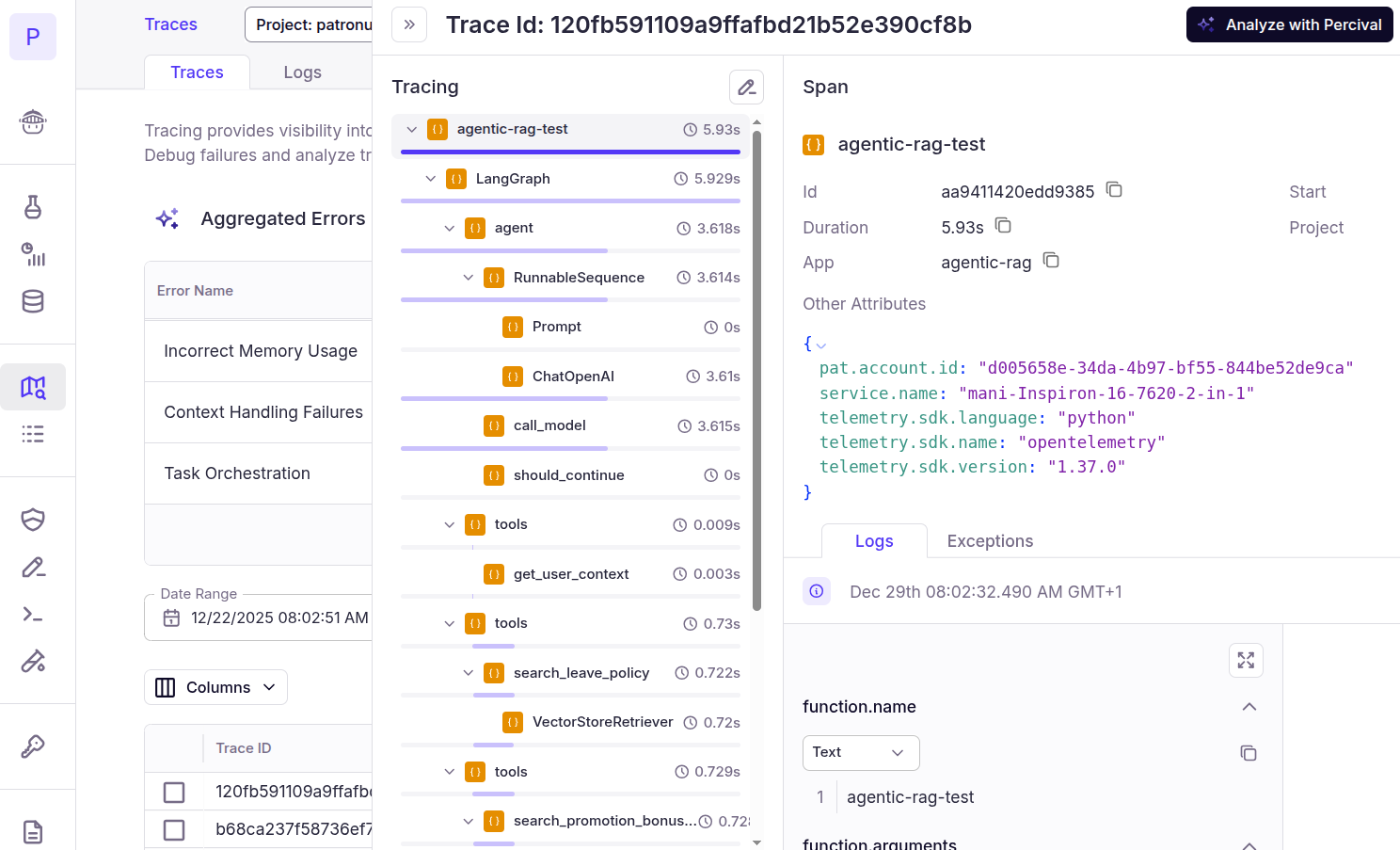
Now, if you go to your Patronus Dashboard and click “Traces” from the left sidebar, you will see a list of all your traces. You can filter traces by a project name. Clicking a trace name displays the complete trace. For example, the “agentic-rag-test” added in the previous script looks like this. You can see the complete workflow that the agent executed to generate the final response, including tool calls and intermediate spans.
Click the “Analyze with Percival” to get Percival’s complete trace analysis. You will see the following page:
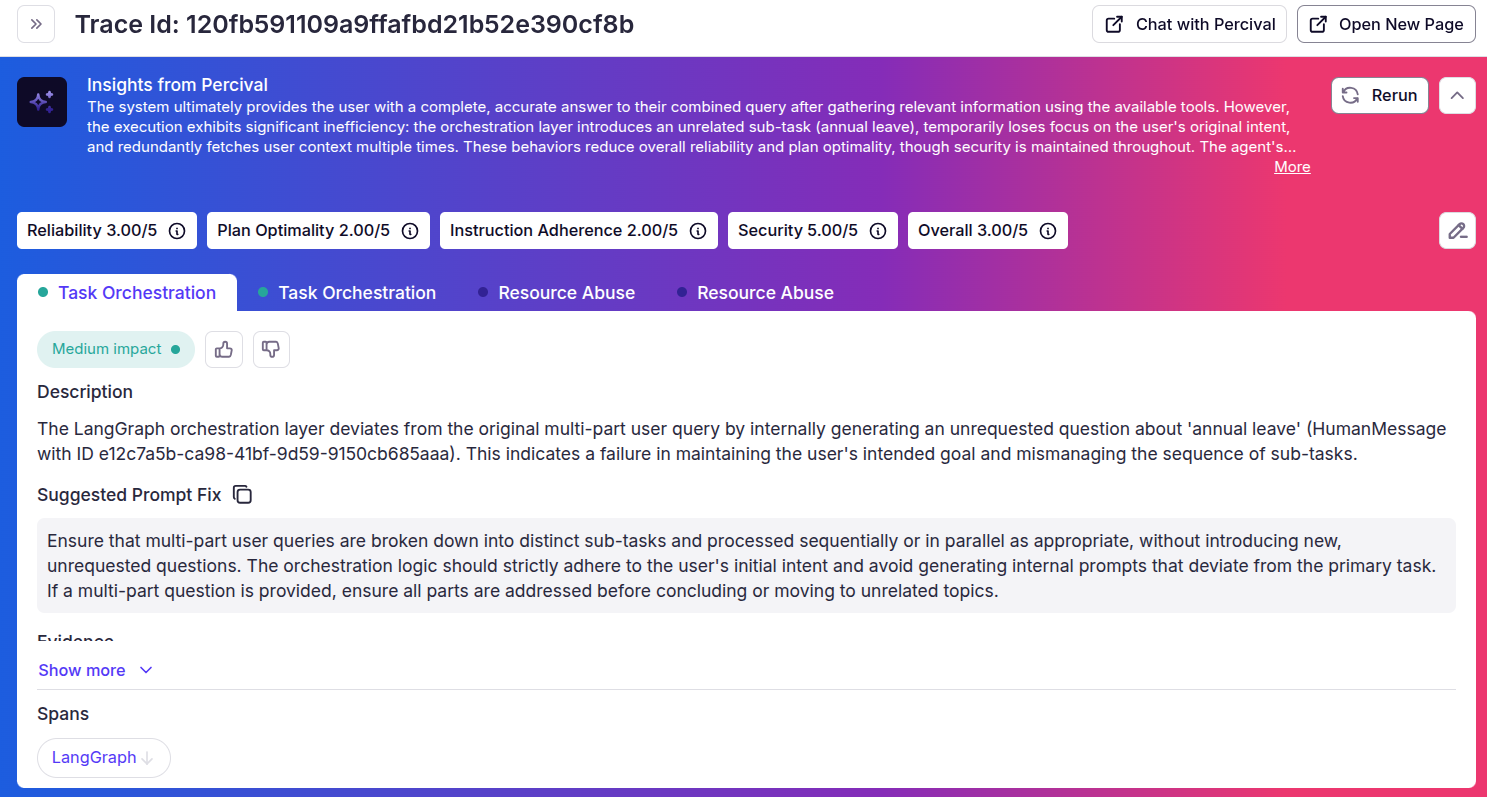
The above analysis shows that Percival identified a few issues in our agentic RAG application and also suggested some improvements. Though the final agent output is correct, the internal orchestration workflow has some flaws that can be fixed.
{{banner-dark-small-1="/banners"}}
Final thoughts
Agentic RAG extends the traditional retrieval-augmented approach by incorporating memory, planning, and dynamic tool use, making it better suited to real-world, multi-step workflows. With the right frameworks in place and observability tools like Patronus AI, implementing and monitoring these systems becomes far more practical. Once you understand how retrieval, tools, memory, and planning fit together, the architecture becomes both modular and extendable.
Patronus AI complements this development model by offering end-to-end observability and evaluation. Its tracing and debugging features make it easier to inspect agent behavior, catch silent failures, and refine application pipelines, all without overhauling your application stack.
Explore Patronus AI to build, test, and debug reliable agentic systems at scale.